How to Convert Any Photo into GTA VI Style Artwork (Ultimate AI Guide)
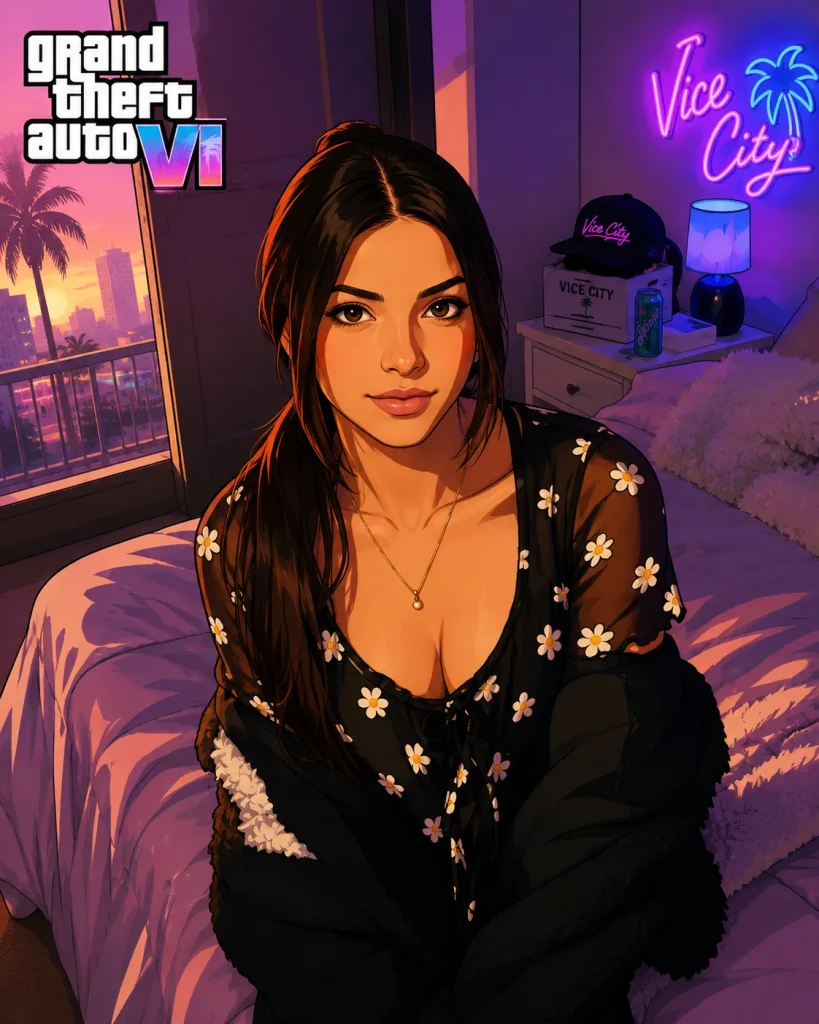
The visual aesthetic of Rockstar Games’ Grand Theft Auto VI—rich in Vice City neon palettes, saturated sunset pastels, dramatic low-angle framing, and cel-shaded digital painting—has become one of the most recognized visual styles in modern gaming.
Whether you want to transform your own selfie into a loading screen protagonist or create viral social media artwork for your audience, modern AI image generators make this process remarkably simple.
In this guide, we will walk you through the exact prompts, model settings, pre-processing rules, and troubleshooting steps to convert any photo into authentic GTA VI promotional artwork using ChatGPT, Google Gemini, and Midjourney.
1. Pre-Flight Check: Choosing the Best Source Photo
The quality of your source photo directly determines how accurately AI tools retain your face and hair structure while applying the Vice City graphic novel art style. For optimal results, pick a photo with:
- Framing: Chest-up or half-body portrait shots yield the strongest character emphasis. Avoid far-away full-body photos where facial details are small.
- Lighting: Clear, even lighting across the face. Avoid blurry images, severe backlighting, or extreme shadows.
- Pose & Expression: Confident direct-to-camera gaze or a sharp 3/4 dynamic profile. Confident or neutral expressions translate best into Rockstar’s stylized artwork.
2. Step-by-Step AI Workflows
Method A: ChatGPT (GPT-4o / DALL-E 3)
- Open ChatGPT and start a new chat.
- Click the
+(Attachment) button to upload your portrait photo. - Copy one of the master prompts below, paste it into the prompt box, and hit send.
- Refinement Rule: If the AI changes your face too much, reply:“Keep the exact facial geometry, eye shape, and hair structure from the original uploaded photo, but retain the GTA VI cel-shaded digital art style.”
Method B: Google Gemini
- Open Google Gemini and select the image creation engine.
- Click the Plus (+) icon to upload your source photo.
- Paste the prompt text into the instruction field.
- Refinement Rule: If Gemini generates a photorealistic image instead of graphic artwork, re-prompt:“Render as a stylized 2D/3D digital art cover illustration with bold outlines and vector shading, not a real photograph.”
3. Ready-to-Use Master AI Prompts
Prompt 1: Official GTA VI Character Select / Cover Art
Best for: Profile pictures, selfies, and main protagonist posts.
Transform this uploaded photo into an official GTA VI digital character illustration. Preserve the person’s exact facial features, hair, and expression. Frame the subject from a dramatic low-angle chest-up shot. Dress the subject in Vice City-style tropical streetwear with subtle gold chain accents. Set the background to a vibrant Miami neon sunset with palm tree silhouettes and a sleek muscle car parked in the background. The rendering must feature bold vector outlines, smooth cel-shading, rich saturated colors (magenta, cyan, warm gold), hard-edge shadows, and a subtle halftone print texture characteristic of Rockstar promotional loading screens. High contrast, clean detail.
Prompt 2: Vice City Nightlife & Street Action
Best for: Urban, night, or street photos.
Reimagine the subject in this photo as a playable GTA VI protagonist standing in a Vice City alleyway at dusk. Keep the facial likeness and hair strictly identical to the original image. Apply a 2D/3D digital paint art filter with hard edge contours, expressive lighting highlights, and stylized cel-shaded details. The background should feature glowing neon signs, wet asphalt with magenta reflections, and atmospheric ocean mist. Saturated pastels, high-energy graphic poster style, Rockstar promotional artwork aesthetic.
Prompt 3: Dual Character / Criminal Duo Style
Best for: Couple photos or two-person shots inspired by Jason & Lucia.
Convert this photo into a GTA VI criminal duo promotional poster. Maintain the exact facial identities and hair of both subjects in the image. Pose them in a dynamic action stance against a Leonida beach sunset backdrop with helicopter silhouettes in the sky. Render as high-contrast Rockstar character art with clean edge separation, saturated tropical color grading, painterly textures, and dramatic rim lighting.
4. Deconstructing the Prompt Mechanics
Why do these specific prompts work while generic requests fail? Let’s break down the key trigger terms:
| Element | Trigger Term | Visual Impact |
| Perspective | Low-angle chest-up shot | Gives characters an iconic, larger-than-life “heroic” presence typical of video game covers. |
| Art Style | Cel-shading, hard-edge shadows, vector line art | Forces the AI engine to drop realistic photographic textures in favor of graphic illustration. |
| Color Palette | Magenta, cyan, tropical pastels, warm gold | Instantly applies the recognizable Vice City sunset tone. |
| Likeness Preservation | Preserve exact facial features and expression | Tells the vision model to prioritize source identity mapping over artistic abstraction. |
5. Advanced Midjourney v6 Workflow
For readers using Midjourney v6, take advantage of native character references (--cref) for exact facial fidelity:
[Image_URL] official GTA VI video game cover illustration, character portrait, Vice City neon dusk background, high contrast cel shading, bold line art, vector illustration style, sunset lighting, vibrant magenta and gold palette –cref [Image_URL] –cw 80 –ar 16:9 –v 6.0
--cref [URL]: Passes your uploaded photo URL directly to Midjourney’s face engine.
--cw 80: Maintains strong facial structure while allowing outfit and lighting adjustments.
--ar 16:9: Formats the output for banners and desktop wallpapers.
6. Post-Processing: The 2-Minute Rockstar Polish
To give raw AI outputs an authentic studio finish before publishing:
- Color Saturation: Open the generated artwork in Canva or Photoshop and increase Vibrance (+20%), prioritizing pink, cyan, and gold tones.
- Halftone Texture Overlay: Add a subtle halftone dot overlay (at 10–15% opacity) to replicate comic/screen-print poster textures.
- Rim Light Glow: Use a soft glow brush along subject edges to simulate Vice City sunlight reflections.