How to Add a Live Wallpaper to Your Desktop
Static wallpapers are fine, but a live wallpaper brings your desktop to life with subtle motion, animation, or even video playing right behind your icons. If you’re looking to set up live wallpapers PC style, this quick guide walks you through everything you need.
What Is a Live Wallpaper?
A live wallpaper is an animated or interactive background for your desktop — think slow-moving clouds, a flowing river, a glowing city skyline, or a looping video clip. Unlike a regular image, it changes and moves while you work.
How to Set Live Wallpaper on Windows PC Using Lively Wallpaper
Lively Wallpaper is a free, open-source app and one of the easiest ways to get a live wallpaper PC setup running on Windows. Here’s how to set live wallpaper using it, step by step:
- Download Lively Wallpaper. Head to the official Lively Wallpaper website or the Microsoft Store and download the latest version for free.
- Install the app. Run the installer and follow the on-screen prompts to complete setup.
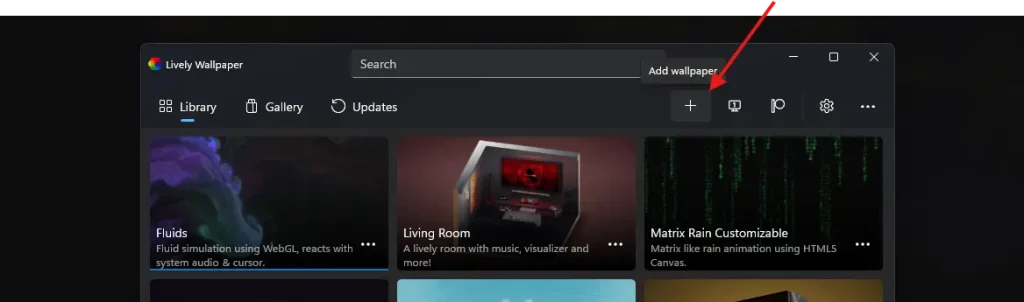
- Open Lively Wallpaper. Launch it from your Start menu — you’ll see a clean library screen where you can browse or add wallpapers.
- Pick a wallpaper. Use the built-in library, or click the + button to add your own video, GIF, or website-based wallpaper. You can also browse community wallpapers directly inside the app.
- Apply it to your desktop. Click on your chosen wallpaper and select Apply. It will immediately start playing on your desktop background.
- Adjust performance settings. Go to the Settings tab to control playback (pause on battery, pause when an app is fullscreen, mute audio, limit FPS) so it doesn’t slow down your live wallpapers PC experience.
Tips for Choosing the Best Live Wallpaper
- Check your system specs — live wallpapers use more CPU/GPU than static images, so lower-end PCs should choose lightweight animations.
- Use battery-saver mode on laptops to avoid draining power quickly.
- Find a good site to download live wallpapers for free – https://moewalls.com/
Final Thoughts
Setting up a live wallpaper is one of the easiest ways to personalize your desktop and make it feel more dynamic. With free tools readily available, anyone can turn a plain desktop into something eye-catching in just a few minutes.